
 Odio el Chocolate
 Suzy Says
 When the Clock Stops
 Cobb Can Move
 Trees Hate You
 Frankie's Fun House
 You Are Hamster
An ordinary room becomes a rule test
Suzy Says is a first-person rules-based survival horror game built around a deliberately uncomfortable contrast. You return home and find an interactive DVD and colorful floor mats. Those objects suggest an innocent activity, but the instructions turn the room into somewhere you must pay close attention. The familiar idea of Simon Says provides a useful starting point: the wording of a command matters as much as the action it describes. This is not a promise that every instruction uses exactly the same formula throughout the experience. Read and listen to what the current scene actually asks.
For visitors arriving from Odio el Chocolate, the important change of pace is attention rather than collecting a long list of objectives. Bright colors do not make a scene safe, and an instruction that sounds familiar is not necessarily permission to move. Approach the opening as a chance to learn how this particular session communicates. Look at the room, notice the mats, and give each instruction enough time to finish before deciding what it means. The advice on this page is preparation, not a verified route through every encounter.
Set up a session you can comfortably leave
The game contains flashing imagery, jump scares, and unsettling themes. Consider those warnings before selecting the player rather than after the first surprise. If these effects are uncomfortable for you, reading the guide instead is a valid choice. There is no requirement to finish a horror game in one sitting, and this page does not treat enduring distress as an achievement. Use a comfortable volume and a viewing distance that lets you look away easily. Do not assume that a browser setting removes effects generated inside the game.
Before starting, decide how you will stop. Switching away from an iframe does not establish that the game has paused, and closing the page may discard progress. Look for the game's own pause or exit controls once the menu appears. If you need to leave immediately, your comfort matters more than preserving a run. The preparation checklist below belongs to this guide only. Its checkmarks neither unlock content nor record game progress, and resetting it does not restart the embedded game.
Understand the browser adaptation
This player uses a Construct 3 web adaptation hosted separately from the guide. Its initial load is approximately 256 MB, so the first visit can take substantially longer than loading the surrounding text and cover. A visible cover is not evidence that those game resources have already downloaded. Start on a connection where that transfer is acceptable, especially if you have a mobile data limit. Loading time varies with the connection, device, browser, and host; a fixed countdown would be misleading.
Once you select Play, allow time for a recognizable game menu or scene. Repeatedly refreshing can interrupt an incomplete transfer and make troubleshooting harder. A blank frame alone does not identify whether the cause is the network, browser resources, or an embedding restriction. If loading fails, note the browser, device, and last visible state before trying again later. This guide intentionally does not offer a separate top-level game link as a workaround. The intended experience stays in the embedded player, and successful loading still needs to be checked on your device.
Learn movement before reacting quickly
The supplied keyboard controls are WASD for movement, Space for jumping, and C for crouching. Click inside the game when it is ready so that your keyboard input reaches the frame rather than the surrounding webpage. If Space scrolls the guide instead of producing the intended action, release the key and restore focus before trying again. Treat any additional instructions displayed by the running game as the authority for that session. This page does not invent an interaction key or promise controller support.
Test one input at a time when the opening permits it. A short movement is easier to evaluate than pressing several keys while also turning or jumping. Check that you can recognize your position relative to the colored mats before a command demands a quick decision. This is a preparation technique, not a claim that the game provides a risk-free training area. If a rule is already active, follow it rather than experimenting. Familiarity with the keys should reduce accidental actions, not encourage ignoring what the DVD is saying.
Separate hearing a verb from receiving permission
A Simon Says style challenge asks you to distinguish an instruction from the condition that makes that instruction valid. In Suzy Says, that distinction is the central reason to listen carefully. Hearing a movement word can create an urge to act immediately, particularly when the presentation is tense. Try to identify the complete command before committing to an action. Do not replace the current wording with a phrase remembered from an earlier round, a video, or a different game using the same childhood premise.
One practical mental routine is to identify the speaker's instruction, check its condition, and only then choose a movement. This routine is editorial advice rather than a disclosed internal scoring rule. There is no verified timing window or universal safe delay supplied here. If the running game introduces a deadline, that deadline takes precedence over reading this page. The goal is to make a deliberate response within the actual rules, not to stand still indefinitely or assume that hesitation is always safer than movement.
Use the room as context, not a guessed solution
The colored floor mats help establish the physical setting of the DVD activity. They are useful reference points when you orient yourself, but this guide does not assign an unverified meaning, order, or safety ranking to individual colors. A screenshot of a mat cannot by itself tell you what the next command requires. Compare the instruction with what you can currently see instead of memorizing a supposed sequence that may not match the hosted adaptation. Avoid treating decorative details as confirmed puzzle answers.
When an attempt becomes confusing, separate the things you observed from your explanation of them. You might remember moving before a sentence finished; that is an observation about your action. Concluding that a particular color always causes failure would require more evidence. Keeping that distinction makes later attempts more useful and prevents a surprising moment from becoming a false rule. The same approach applies to sounds and visual changes: notice them, but do not assume a cue has a specific mechanical meaning until the game establishes it.
A useful retry changes one decision
If you choose to attempt another run, give yourself a small question rather than a demand to complete everything. You might focus on hearing the full wording, remembering which key crouches, or keeping track of your location. Changing one habit makes it easier to understand whether it helped. This page cannot promise that retries preserve resources or checkpoints, because the hosted version's full progression and save behavior have not been verified. Read its own prompts before selecting a restart or leaving the session.
Avoid using a failure as proof of an unseen ending requirement. Horror presentation can make ordinary uncertainty feel like a secret, but a guide should not turn that feeling into invented instructions. There is no confirmed list here of objects to collect, hidden codes, or actions that guarantee survival. If you record a note for yourself, make it specific to the attempt: what the command said, what you did, and what happened next. That is more informative than assigning a broad rule to every future scene.
Phones need a separate compatibility check
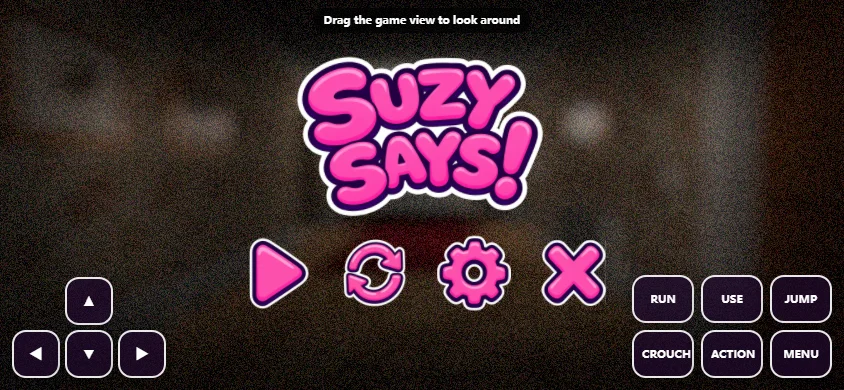
The host includes touch adaptation, but physical-phone play has not been verified. A responsive guide and a sixteen-by-nine player do not establish that every game action is comfortable on a small screen. If you try a phone, inspect the visible controls and test whether movement and the actions needed by the current scene can actually be performed. Landscape orientation may provide more room, but it does not guarantee performance, readable text, or a complete control layout on your device.
The initial transfer and browser memory requirements are separate considerations. A fast connection does not necessarily solve a device struggling to run the game, and a powerful phone does not make a weak connection download instantly. Avoid opening several copies of the player while diagnosing a problem. If touch input is incomplete or the scene cannot be controlled reliably, do not interpret that as part of the puzzle. Switch to a keyboard-equipped computer if available, or return to the guide without claiming the mobile attempt was a valid gameplay test.
Watch references without confusing versions
Two optional video references are available below. They can help you recognize the presentation and compare what you have seen, but they may contain surprises or later scenes. Decide whether you want that information before opening a video. A recording also reflects the version, settings, and decisions used by its uploader. It is not evidence that the browser adaptation includes every menu, mode, sequence, or ending visible in the recording. Use the current game's own interface to establish what is actually accessible.
The original complete release is described as including endless play and hidden endings. Those features have not been confirmed in this hosted adaptation, so this page does not advertise a guaranteed complete edition or a guaranteed ending route. That boundary matters when deciding how much time to invest in exploring. You can enjoy learning the rule-following premise without assuming that a particular unlock must exist. If a video shows something absent from your menu, a version difference is a possibility, not proof that you missed a secret step.
Keep expectations grounded before pressing Play
The best use of this page is to remove avoidable uncertainty before the game creates its own. You know the main keyboard controls, the approximate initial download, the content warnings, and the limits of the available compatibility information. You also know that the guide checklist is not a game save. None of those facts removes the horror or solves the rules for you. They simply let you decide whether this is an appropriate session and what to check first if the player does not behave as expected.
Read the visible command, respond deliberately, and leave room for the possibility that your first interpretation was wrong. Stop when you need to, and do not confuse a technical problem with a required challenge. Suzy Says works as a premise because familiar instructions become uncomfortable in an unfamiliar context. This guide preserves that uncertainty without inventing a victory sequence. When you are ready, return to the player above; when you are not, the controls, warnings, and questions remain readable without starting the large game download.
Session preparation
This page-only checklist is not synchronized with game saves.
0 / 5 checked
Optional video references
These recordings may reveal later scenes or show version differences.
Frequently asked questions
What is Suzy Says?
A first-person rule-following survival horror game involving an interactive DVD and colored floor mats after returning home.
What are the keyboard controls?
WASD moves, Space jumps, and C crouches. Focus the frame and follow any additional instructions shown by the game.
Why is the first load slow?
The Construct 3 web adaptation loads approximately 256 MB. The guide cover appears before those resources have finished downloading.
Is phone play confirmed?
Touch adaptation exists, but real-phone play has not been verified. Responsive page layout does not guarantee playable controls or performance.
Does this include every ending?
The original complete release has endless play and hidden endings, but their availability in this host is unconfirmed.
Are there content warnings?
Yes: flashing imagery, jump scares, and unsettling themes. Choose whether to play before launching the frame.
Does the checklist save my game?
No. It is a temporary page-only preparation aid. Resetting it changes only the checklist.
Can I use the videos without spoilers?
No spoiler-free guarantee is possible. The optional recordings may show later scenes and may differ from this adaptation.